
Levo guides · Developers: everything else
How to find and delete node_modules folders across your Mac
Every node_modules folder can be deleted. npm install, pnpm install or yarn rebuilds it from the lockfile. The only question is which ones are worth the reinstall time, and the answer is usually the projects you haven’t opened in a month.
| What | Where | Safe to delete? |
|---|---|---|
| Project dependencies | <project>/node_modules | Yes, install rebuilds it |
| Nested copies | node_modules/*/node_modules | Leave them, they go with the parent |
| Linked packages | Symlinks made by npm link | Delete the link, not the source it points to |
| Global packages | /opt/homebrew/lib/node_modules or your Node version’s lib | No, those are tools you installed on purpose |
Why there are so many
Each JavaScript project keeps its own copy of every dependency, and most of them also keep the dependencies of their dependencies. A small React app is easily 300 MB. A monorepo can pass 2 GB. A few years of side projects, tutorials and cloned repos adds up to tens of gigabytes you never think about, because the folders sit inside projects you only open now and then.
How to do it yourself
Find them all
Open Terminal and list every node_modules folder under your home folder, biggest last. The -prune stops find from walking into each one, which is what keeps it fast.
find ~ -name node_modules -type d -prune -not -path "*/Library/*" -exec du -sh {} + 2>/dev/null | sort -h | tail -30The list shows the size and the path. Anything under ~/Library is skipped on purpose: apps such as editors and Electron tools keep their own copies there, and those are not yours to remove. The same goes for folders inside an app bundle.
Delete one project’s folder
cd ~/Developer/old-project
rm -rf node_modules
That is permanent: rm does not use the Trash. Check the path before you press return. If you would rather be able to undo it, drag the folder to the Trash in Finder instead, though Finder can take a long time to move a folder with 50,000 small files in it.
Delete many at once with npkill
npkill scans a folder, lists every node_modules with its size and last-modified date, and lets you delete with the arrow keys and space. You don’t have to install it.
cd ~/Developer
npx npkill
Sort by size or by last modified, and work down the list. The last-modified column is the useful one: a folder untouched for a year is a safe bet.
Which projects to skip
- Anything you’re working in this week. A reinstall takes a few minutes, but it also needs the network and can pull newer versions if your lockfile is loose.
- Projects with no lockfile. Without
package-lock.json,pnpm-lock.yamloryarn.lock, a reinstall may not give you the same versions you had. Check that the lockfile is committed first. - Projects with local patches. If you edited a file inside
node_modulesby hand and never usedpatch-packageorpnpm patch, that edit is gone with the folder. - Old projects that depend on a package that has since been removed from npm, or a private registry you can’t reach any more. Rare, but it is the one case where deleting loses something for good.
- Anything you need offline. If you’re about to travel and want to run the project on a plane, leave it alone.
With pnpm, node_modules is mostly links into one shared store, so deleting project folders frees less than du suggests. The files are only freed when nothing links to them, and then only after pnpm store prune. See how to clear npm, pnpm, Yarn and Bun caches.
Also worth a look
Next to node_modules, projects leave build output: .next, .nuxt, dist, .turbo, .parcel-cache. These are rebuilt by the next build, but check that dist isn’t committed to git before you remove it, since some projects ship it on purpose. Python projects leave their own heavy folders too, covered in how to find and delete old Python virtual environments.
How Levo does it
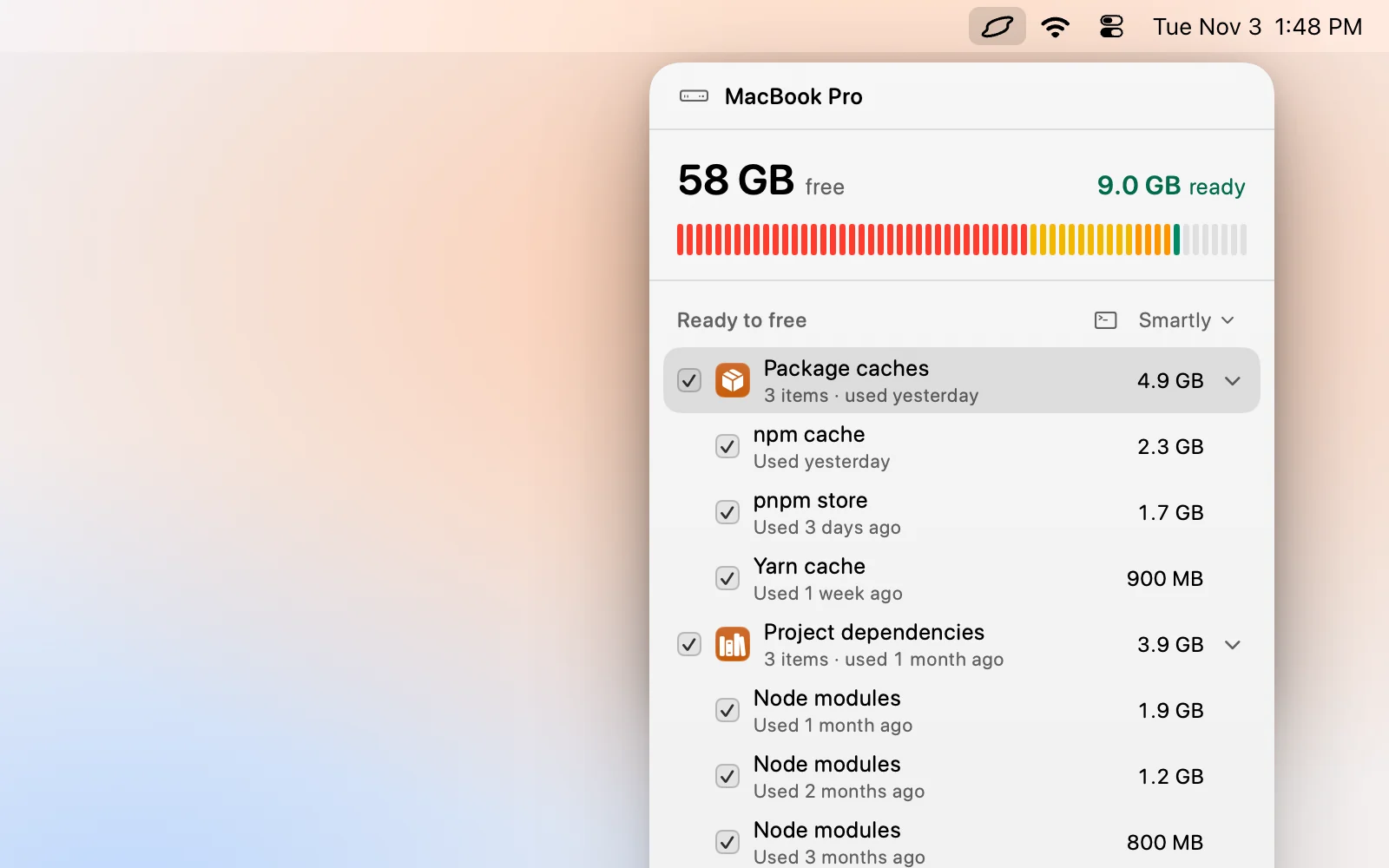
Levo keeps a live index of what fills your disk, so it already knows where every node_modules is and how big it is. They show up in Ready to free under project dependencies, each with a size and a reason, next to your package caches.
Your own AI agent does the judging. It reads each project and decides whether it’s idle, and Levo ticks a folder only when nothing is running inside it: no dev server, no open file, no coding agent session. A project you touched this morning stays unticked. The agent can only read. Levo does the deleting itself, and checks each folder again right before it goes.
You choose a cleanup level, use Select › Smartly, untick anything you want to keep and press Clean up. With Move to Trash on, you can put a folder back. The setup is described in Levo for web developers. Watching and suggestions are free, and so are two cleanups, then there’s a lifetime licence.
FAQ
How much space does node_modules use?
It depends on the project. A small app is often 200 to 400 MB and a large monorepo can pass 2 GB. Across a few years of projects, most developers find 10 to 50 GB spread over dozens of folders.
Will deleting node_modules break my project?
No. The folder is rebuilt from your lockfile the next time you run npm install, pnpm install or yarn. The project’s source files are not touched. The exceptions are hand-edited files inside the folder and packages that have been pulled from npm.
Is it safe to delete node_modules while a dev server is running?
Don’t. The server may crash or serve broken pages, and a file watcher can fail halfway through the deletion. Stop the server first.
Why is rm -rf node_modules so slow?
A single folder can hold 50,000 to 200,000 small files, and each one has to be removed separately. It’s slower on a nearly full disk. Deleting from Terminal is much faster than moving the folder to the Trash in Finder.
Do I need to delete the lockfile too?
No. Keep package-lock.json, pnpm-lock.yaml or yarn.lock. It is the record that lets the reinstall give you the same versions.