
Levo guides · Developers: everything else
Docker using too much disk space on a Mac
Docker on a Mac stores everything in one big virtual disk file, Docker.raw, and that file grows but doesn’t shrink by itself. Run docker system df to see what uses it, then docker system prune and docker builder prune to free it.
| What | How to see it | Safe to delete? |
|---|---|---|
| Stopped containers | docker ps -a | Yes, unless you need what’s inside one |
| Unused images | docker images | Yes, they’re pulled or rebuilt on demand |
| Build cache | docker builder du | Yes, the next build is slower |
| Volumes | docker volume ls | Careful. A database lives here |
| The disk file | ~/Library/Containers/com.docker.docker/Data/vms/0/data/Docker.raw | Never by hand |
Why Docker.raw is so big
Containers run in a small Linux VM, and the VM’s disk is a single file on your Mac. Docker Desktop sets a maximum size, often 60 GB or more, and the file grows towards it as you pull images and build. In Finder it can look much larger than it is, because it’s a sparse file: ls -lh shows the maximum, du -sh shows what is really used.
The catch is that deleting images frees space inside the VM, but the file on your Mac doesn’t shrink straight away. Recent versions of Docker Desktop hand freed blocks back to macOS, but on older setups or after heavy churn you may need to resize the disk or reset it from Settings › Resources.
How to do it yourself
See what uses the space
docker system df
docker system df -v
The first command gives totals for images, containers, volumes and build cache, with a RECLAIMABLE column. The second lists each one. Build cache is the quiet one: after a few weeks of builds it is often the biggest line.
Free it
docker container prune
docker image prune -a
docker builder prune
docker system prune
docker container pruneremoves stopped containers.docker image prune -aremoves every image not used by a container, including tagged ones. Without-ait only removes dangling images.docker builder pruneremoves the build cache. Add--allto include cache that’s in use by tagged builds.docker system prunedoes containers, networks, dangling images and build cache in one go. It does not remove volumes unless you add--volumes.
Volumes are where databases, uploaded files and anything your compose file mounted at a named volume live. docker system prune --volumes removes every volume that no container uses right now, including the Postgres one from the project you will open next week. List them with docker volume ls and remove one at a time with docker volume rm <name> after checking.
Give the space back to macOS
After pruning, check the real size again.
du -sh ~/Library/Containers/com.docker.docker/Data/vms/0/data/Docker.rawIf it is still huge, open Docker Desktop, go to Settings › Resources and lower Virtual disk limit, or choose Troubleshoot › Clean / Purge data to start fresh. The second option deletes all your images, containers and volumes. Don’t drag Docker.raw to the Trash while Docker is running: you lose everything inside it and can corrupt the VM.
OrbStack, Colima and Podman
The same commands work, because they all speak the Docker API. What differs is where the disk lives.
- OrbStack shrinks its disk automatically and uses space on demand. Its data is in
~/.orbstack. Check Settings in the app, and usedocker system dfas above. - Colima keeps its disk under
~/.colima. The size is fixed when you create the instance withcolima start --disk 100.colima deleteremoves the whole VM. - Podman uses
podman system dfandpodman system prune, with its machine image under~/.local/share/containers/podman/machine.
If you no longer use Docker at all, see how to uninstall Docker on a Mac. For a wider look at the rest of your toolchain, there’s developer disk cleanup.
How Levo does it
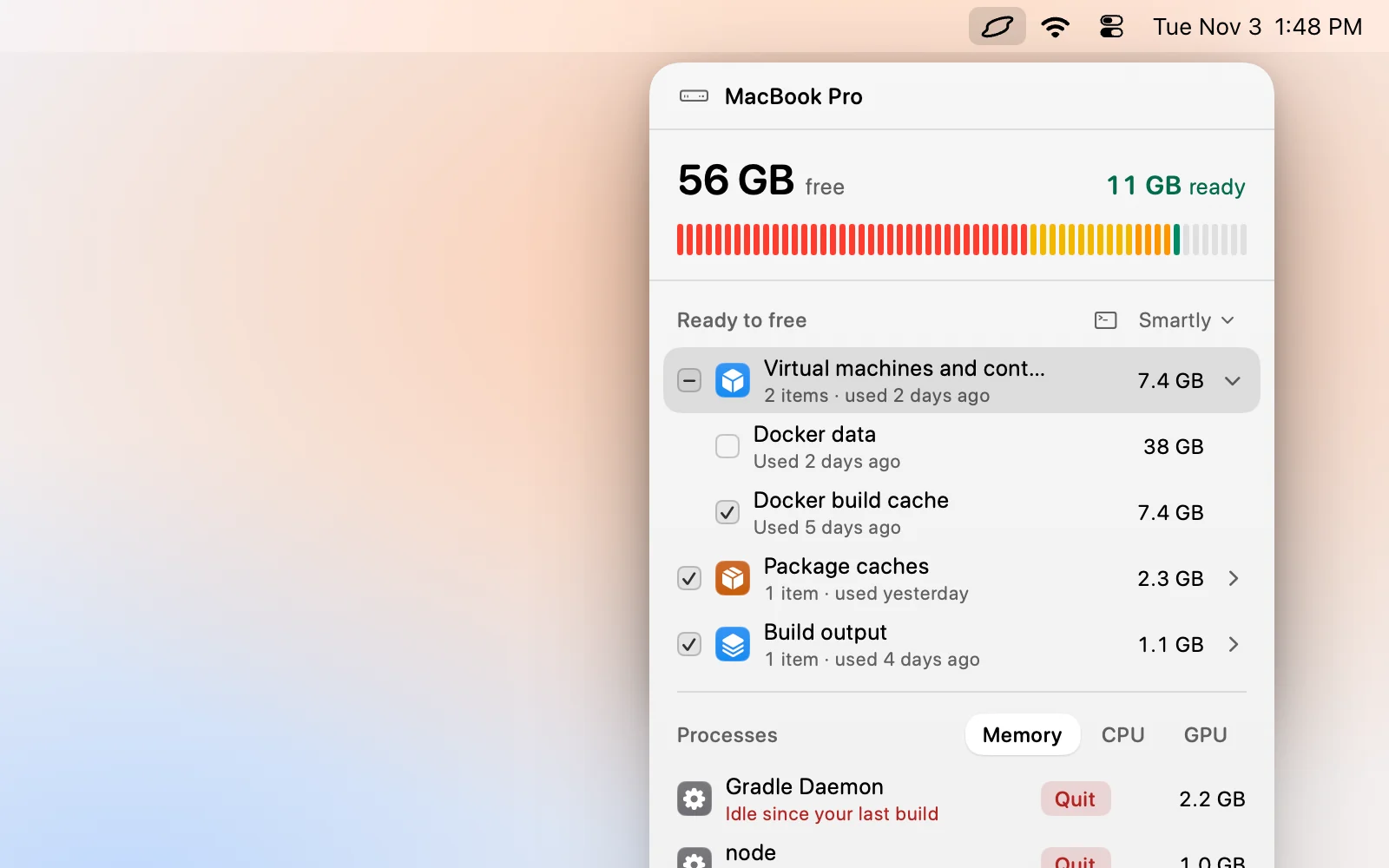
Levo lists Docker images and build cache as their own kinds in Ready to free, with sizes and reasons. It finds them through its live index of your disk, so you see them without running a command, and without having to remember which of the four prune commands to use.
Your agent judges what’s safe. Images that nothing uses and build cache are ordinary candidates. Volumes can hold data you can’t get back, so look at those yourself, and Levo never cleans anything that’s in use. The agent only reads, and Levo does the deleting after checking again.
You choose a cleanup level, tick what goes and press Clean up. If you uninstall Docker Desktop with Levo, the confirm step lists its big leftovers so you see them before they go. See Levo for web developers. Two cleanups are free, then there’s a lifetime licence.
FAQ
Is it safe to run docker system prune?
Yes for containers, networks, dangling images and build cache, but the next build will be slower and some images will be pulled again. It leaves volumes alone unless you add --volumes, which is the flag to be careful with.
Why is Docker.raw still huge after I deleted images?
The file is sparse and doesn’t always shrink when space inside the VM is freed. Check the real size with du -sh. If it’s still big, lower the virtual disk limit in Docker Desktop’s Resources settings or purge its data.
Can I delete Docker.raw?
Only through Docker Desktop’s Troubleshoot menu with Docker running, or after quitting and uninstalling it. Deleting the file by hand removes every image, container and volume inside it.
How much space does Docker need on a Mac?
It depends on what you run. Plan for 20 to 60 GB if you build a lot of images. The virtual disk limit in Docker Desktop sets the ceiling.
Does OrbStack use less disk than Docker Desktop?
Usually, because it grows and shrinks on demand and shares files with macOS. It still keeps images, build cache and volumes, so docker system df and prune apply there too.