
Compare · Mac cleaners
CleanMyMac vs Levo
CleanMyMac is the best-known Mac cleaner: a polished app with a clear look and a lot in one place. Levo cleans too, but it asks your own AI agent what's safe instead of relying on a fixed list.
Quick verdict
- Pick CleanMyMac if you want one friendly app for cleaning, malware scans, app updates and uninstalling, and you don't use an AI agent.
- Pick Levo if your Mac holds things no fixed list knows about, like build output, emulators, model files and agent worktrees, and you want to see and tick every item with a guard checking it before it goes.
CleanMyMac at a glance
- What it is: an all-in-one Mac maintenance app from MacPaw. Its page lists Smart Care (cleaning, threat scans, performance boosts, software updates and storage decluttering), malware removal, app uninstalling with leftovers, duplicate and similar-photo removal, large and forgotten file detection, and cloud storage cleanup.
- How it decides: it knows a set of places and file types that are safe to clean, and cleans from that set.
- Looks: a polished, visual app that shows what it found as clear categories.
- Needs: macOS 11 or later, per its page.
- Trial: it offers a free trial; the page doesn't say how long.
Levo at a glance
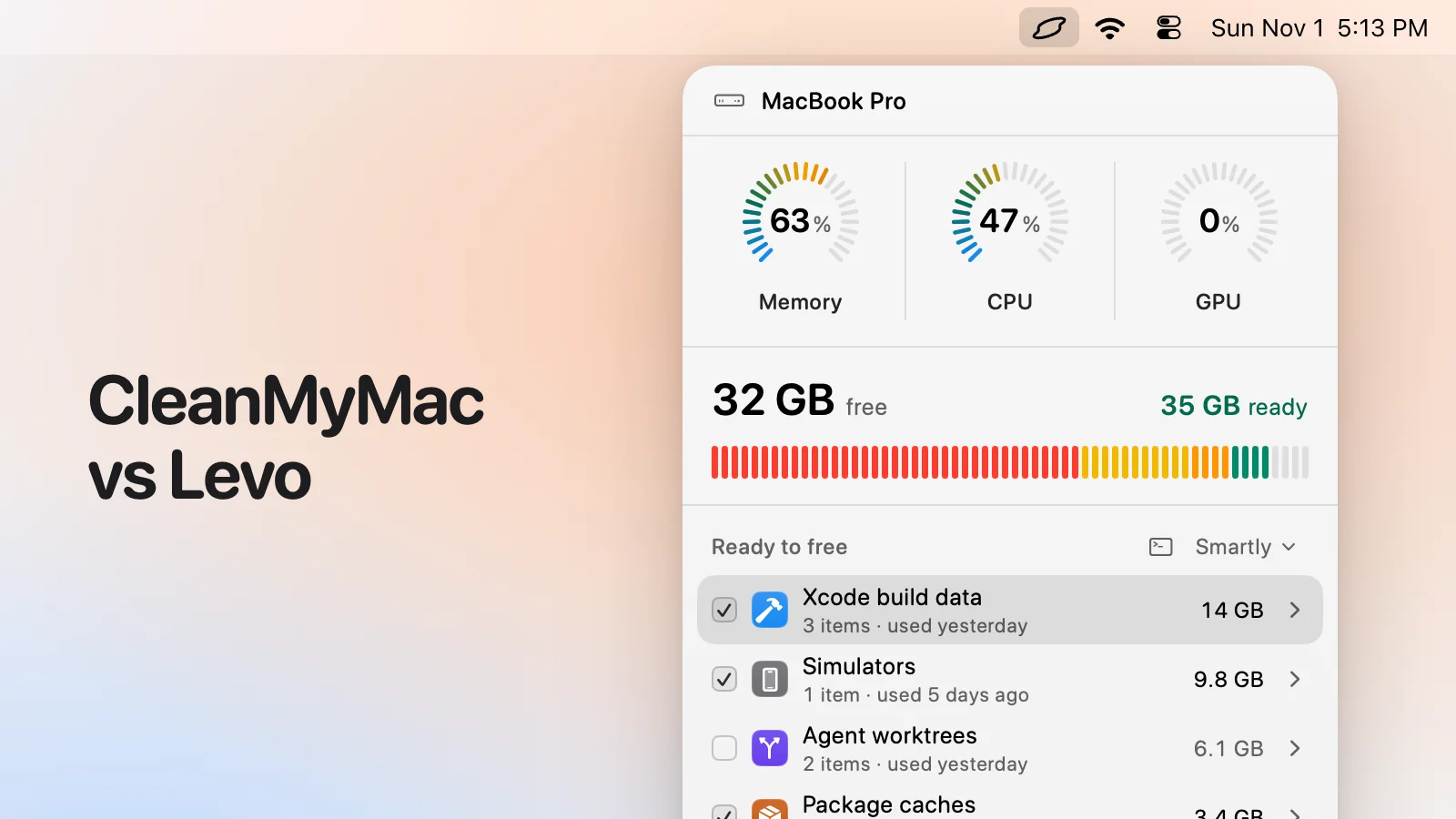
- What it is: a menubar app that watches disk, memory, CPU and GPU against limits you set. Needs macOS 26 or later.
- Who judges: your own AI agent (Claude Code, Codex and others) looks at what Levo found and says what's safe, read-only and in a sandbox. Without an agent, Levo uses its own rules for known tools.
- What you see: every item with its size and the reason it's safe, grouped, with the safe ones ticked at the cleanup level you chose (Careful, Balanced or Aggressive). You tick and untick before anything goes.
- Who deletes: Levo does, never the agent, and a guard checks every item again right before it goes: open files, running apps, unsaved git work, live agent sessions, recent changes, your protected folders.
- Beyond disk: shows the processes behind memory, CPU and GPU and quits what your agent says is idle, uninstalls apps with their leftovers, and can clean on its own with Auto mode.
- Account and price: no account. Watching, suggestions and the first two cleanups are free, then a lifetime licence for 2 Macs. The price is on the Levo page.
Side-by-side
| CleanMyMac | Levo | |
|---|---|---|
| Where it lives | A full app window | A menubar popover that watches in the background |
| Who decides what's junk | A fixed set of known locations | Known tools as a start, then your own AI agent judges everything else |
| What you see before cleaning | Categories with sizes | Every item with size and the reason it's safe; you tick and untick |
| Safety checks | Its own rules | A guard that rechecks every item right before it's removed |
| Alerts | Not stated on its page | Notifies at limits you set, with the answer already in it |
| Memory, CPU and GPU | Performance tools | Shows the processes behind them; your agent says which can be quit |
| Uninstall apps | Yes, with leftovers | Yes, with leftovers, to the Trash, and you can put it back for a day |
| Malware scan | Yes | No |
| Duplicates and similar photos | Yes | No |
| Minimum macOS | macOS 11 | macOS 26 |
| Account | Not stated on its page | None |
Pricing
CleanMyMac's price depends on the plan. Its page says plans start at about US$3.33 a month (Nov 2026); it doesn't list a one-time price, so check its site for the current plans.
Levo is a one-time purchase. Watching your Mac, suggestions and the first two cleanups are free, then a lifetime licence for 2 Macs unlocks cleaning. The price is on the Levo page and goes up as more people buy.
Who should pick which
CleanMyMac is a good fit if
- You want malware scanning, app updates and duplicate-photo cleaning in the same app.
- You don't use an AI agent, and don't want to set one up.
- Your Mac runs a version of macOS older than 26.
- You like a guided, one-button maintenance routine.
Levo is a good fit if
- Your disk fills with developer, creative or odd files that a fixed list can't name.
- You want to see every item, with a reason, and tick what goes.
- You use Claude Code, Codex or another agent and want it to do the judging, with the deleting left to a guard.
- You want alerts at your own limits, and the busiest processes with advice on what to quit.
- You prefer a lifetime licence over a subscription.
Questions
Can I use both?
Yes. They don't conflict. Some people keep a general cleaner for everyday tidying and use Levo for the files that need judgement.
Does Levo need an AI agent?
No. Without one Levo watches your Mac and lists what can go by its own rules for known tools. An agent makes the list more complete.
Does Levo scan for malware?
No. It cleans disk space, frees memory, CPU and GPU and uninstalls apps. It isn't a security tool.
Which one is safer?
Both ask before cleaning. Levo's difference is that your agent can only read, and a guard checks every item against the live state of your Mac right before it's deleted.
Compared on 1 November 2026, from each app's own website. We make Levo.