
Levo guides · Video, audio and design
How to delete Final Cut Pro render files and proxies
Select the library or event in Final Cut Pro, choose File › Delete Generated Library Files (or Delete Generated Event Files), tick render files, and click OK. Final Cut makes render files again when you play or export, so deleting them is safe; proxies and optimised media are safe too, as long as the original footage is still there.
| What | Where | Safe to delete? |
|---|---|---|
| Render files | Inside the library, or a custom storage folder | Yes, made again on playback or export |
| Optimised media | Inside the library, or a custom storage folder | Yes, if the original media is still there |
| Proxy media | Inside the library, or a custom storage folder | Yes, made again from the original when you need it |
| Analysis and thumbnail files | Inside the library | Yes, rebuilt |
| Final Cut’s app cache | ~/Library/Caches/com.apple.FinalCut | Yes, with Final Cut closed |
| Original and imported media | Inside the library, or wherever you linked it | No, it’s your footage |
| Library backups | ~/Movies/Final Cut Backups.localized | Old ones, yes; keep the latest of active projects |
Why a Final Cut library gets so big
A .fcpbundle library looks like one file in Finder, but it’s a folder. Inside, each event keeps your imported media plus everything Final Cut generated from it. Render files are the big one: every effect, title, colour correction or speed change you play back gets rendered in the background, at full quality, in ProRes. A one-hour 4K timeline with a grade on every clip can produce more render data than the footage itself.
Optimised media is a ProRes copy of camera footage that’s hard to decode, such as long-GOP H.264 and HEVC. Proxy media is a smaller copy for editing on a slow Mac or a laptop. Both can double the space a project takes, and both sit there long after the project ships.
To see how big a library really is, select it in Finder and press ⌘I, or in Terminal:
du -sh ~/Movies/*.fcpbundleHow to do it yourself
- Open Final Cut Pro and the library you want to shrink.
- In the sidebar, select the library to clear all of it, or one or more events to clear only those.
- Choose File › Delete Generated Library Files (or Delete Generated Event Files for events).
- Tick Delete Render Files and choose All to clear everything, or Unused Only to keep renders the current timelines still use.
- Tick Delete Optimized Media and Delete Proxy Media too, if the project is finished or the originals are on hand.
- Click OK. The space is freed straight away; no Trash to empty.
Before deleting optimised or proxy media, check that the originals are online. If a clip shows the red “missing” icon, relink it first, or Final Cut has nothing to rebuild from.
Render files on another drive
If you set the library’s Storage Locations (in the library inspector) to a custom folder or an external drive, the generated files live there instead. Delete Generated Files still works, as long as the drive is connected. Leftover Render Files folders from deleted libraries on a scratch drive can be deleted in Finder.
Final Cut’s own cache and old backups
With Final Cut closed, the app cache can go:
rm -rf ~/Library/Caches/com.apple.FinalCutFinal Cut also saves a library backup every 15 minutes while you work, to ~/Movies/Final Cut Backups.localized. These hold the project data only, not media, so they’re small one by one but add up across years. Delete folders for projects you’ve delivered.
Keep libraries lean from the start
- Import with Leave files in place when the footage already lives on a media drive, so the library doesn’t hold a second copy.
- Turn off background rendering in Settings › Playback if your Mac plays effects smoothly without it.
- Only create optimised media for footage your Mac really struggles with.
How Levo does it
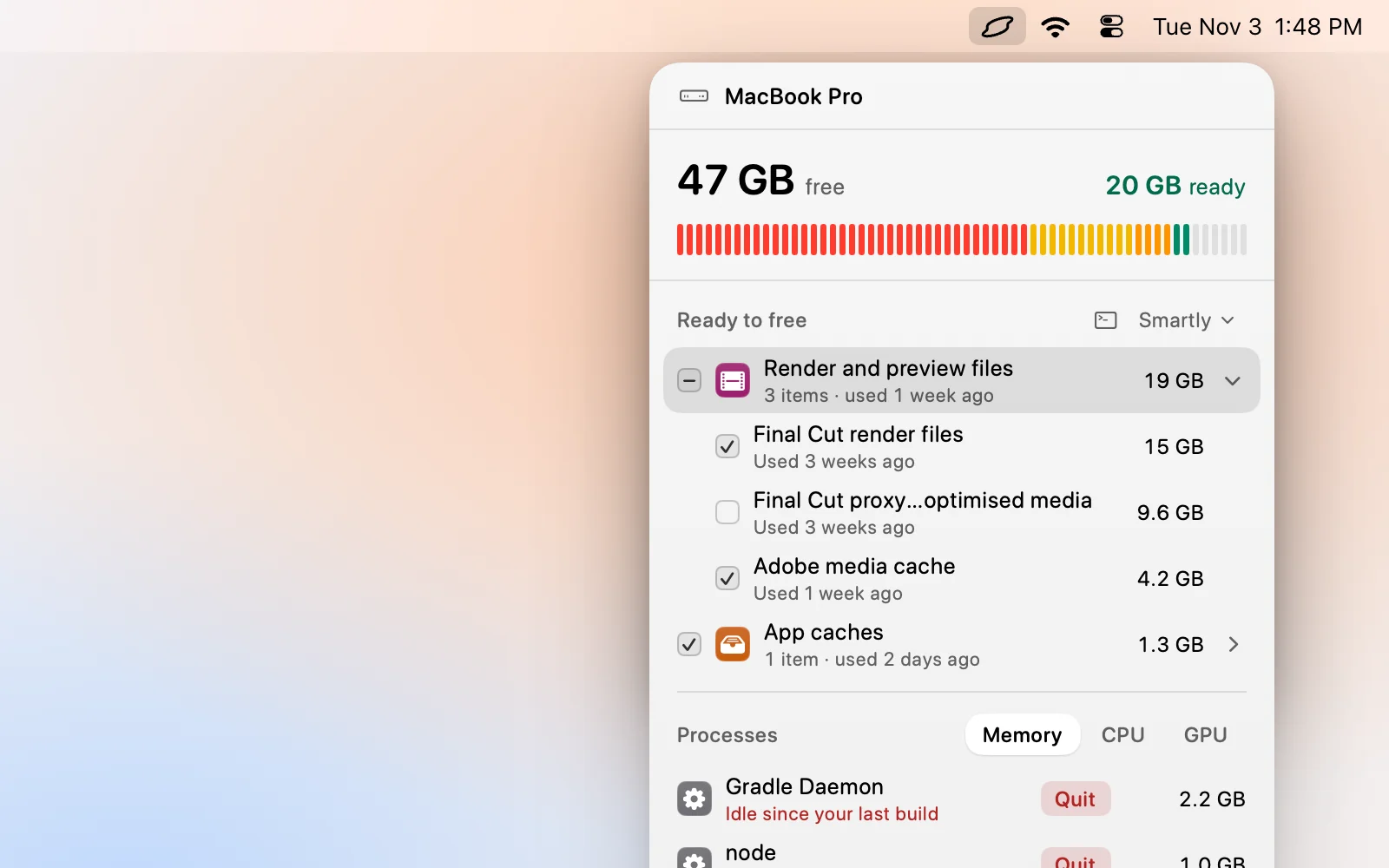
Levo keeps a live index of your disk and lists Final Cut’s render files, analysis files, proxy and optimised media and its app cache in Ready to free, each with its size and project. Render files on an external drive are found too, when the drive is connected. Your own AI agent, such as Claude Code or Codex, says what each item is and whether it comes back; Levo does the deleting.
Your footage, your libraries and your finished projects are never ticked for you. If Final Cut is open, its files show as locked, so a render can’t vanish mid-edit (see Locked items). When a project is delivered, quit Final Cut, open Levo, tick that project’s render and proxy files and press Clean up. More in For video editors.
Levo needs macOS 26 or later. Watching is free; cleaning is two free cleanups, then a lifetime licence.
FAQ
Is it safe to delete Final Cut Pro render files?
Yes. Render files are made again when you play or export the timeline. The only cost is that playback of effects is slower until Final Cut renders them again.
What’s the difference between optimised and proxy media?
Optimised media is a full-quality ProRes copy that’s easier to edit than camera files. Proxy media is a smaller copy for editing on slower Macs. Both are made from the original footage, so either can be deleted while the originals are still there.
Why didn’t my library shrink after Delete Generated Files?
Most of what’s left is probably your imported media, which the command never touches. Also check whether Storage Locations sends generated files to another folder, and whether the library holds old snapshots of projects you duplicated.
Can I delete the Final Cut Backups folder?
Yes, for projects you’ve finished. The backups hold project data, not media. Keep the most recent backup of anything you’re still editing.