
Levo guides · Uninstalling apps
How to uninstall Docker Desktop on a Mac completely
Quit Docker Desktop, open Troubleshoot › Uninstall in its menu, then delete what it leaves in ~/Library/Containers/com.docker.docker and ~/.docker. The big one is a single disk image, Docker.raw, which holds every image, container and volume and often grows past 50 GB.
| What | Where | Safe to delete? |
|---|---|---|
| Docker.raw disk image | ~/Library/Containers/com.docker.docker/Data/vms/0/data/Docker.raw | Yes, but it holds all images, containers and volumes |
| Docker Desktop app | /Applications/Docker.app | Yes |
| Settings and CLI config | ~/.docker | Yes; it holds registry logins and CLI plugins |
| Group container | ~/Library/Group Containers/group.com.docker | Yes |
| App data, logs and caches | ~/Library/Application Support/Docker Desktop, ~/Library/Logs/Docker Desktop, ~/Library/Caches/com.docker.docker | Yes |
| Preferences and saved state | ~/Library/Preferences/com.docker.docker.plist, ~/Library/Saved Application State/com.electron.docker-frontend.savedState | Yes |
| Privileged helpers | /Library/PrivilegedHelperTools/com.docker.vmnetd, com.docker.socket | Yes |
| Helper launch files | /Library/LaunchDaemons/com.docker.vmnetd.plist | Yes |
| Command line links | /usr/local/bin/docker, docker-compose, kubectl.docker | Yes, they point at the removed app |
How to do it yourself
Save what you need first
Everything inside Docker.raw goes with it: images, stopped containers and volumes, including databases you ran in containers. Export any volume you care about, and note images you can’t pull again.
docker volume ls
docker run --rm -v myvolume:/data -v "$PWD":/backup alpine tar czf /backup/myvolume.tgz -C /data .
docker save -o myimage.tar myimage:tag
If you only want space back and plan to keep Docker, you don’t need to uninstall it. See How to clear Docker’s disk space on a Mac.
Uninstall
- Click the Docker whale in the menu bar and choose Troubleshoot, then Uninstall. Newer versions also include a script you can run from Terminal:
/Applications/Docker.app/Contents/MacOS/uninstall- If Docker won’t open, quit it from Activity Monitor and continue by hand: drag
Docker.appto the Trash. - Delete the user-level folders:
rm -rf ~/Library/Containers/com.docker.docker
rm -rf ~/Library/Group\ Containers/group.com.docker
rm -rf ~/Library/Application\ Support/Docker\ Desktop
rm -rf ~/Library/Logs/Docker\ Desktop
rm -rf ~/Library/Caches/com.docker.docker
rm -rf ~/.docker- Remove the helpers and command line links, which need an administrator password:
sudo launchctl bootout system /Library/LaunchDaemons/com.docker.vmnetd.plist 2>/dev/null
sudo rm -f /Library/PrivilegedHelperTools/com.docker.vmnetd /Library/PrivilegedHelperTools/com.docker.socket
sudo rm -f /Library/LaunchDaemons/com.docker.vmnetd.plist
sudo rm -f /usr/local/bin/docker /usr/local/bin/docker-compose /usr/local/bin/kubectl.docker
Check what /usr/local/bin/docker points to with ls -l before removing it. If you also installed Docker through Homebrew or use Colima or OrbStack, that link may belong to them.
Clean the shell
Docker Desktop sometimes adds a docker completions line to ~/.zshrc, and the ~/.docker/bin path may be on your PATH. Open the file, remove those lines, and open a new Terminal window.
Check it’s gone
which docker
ls ~/Library/Containers | grep -i docker
du -sh ~/Library/Containers 2>/dev/null
The last line shows how much sandbox data is left in total; Docker’s share should now be zero.
How Levo does it
Docker is where Levo’s Ready to free list shows Docker images and build cache as their own group, with sizes, so you can see how much of the disk Docker really holds before you decide to remove it. If you only want the space, clean that group and keep Docker.
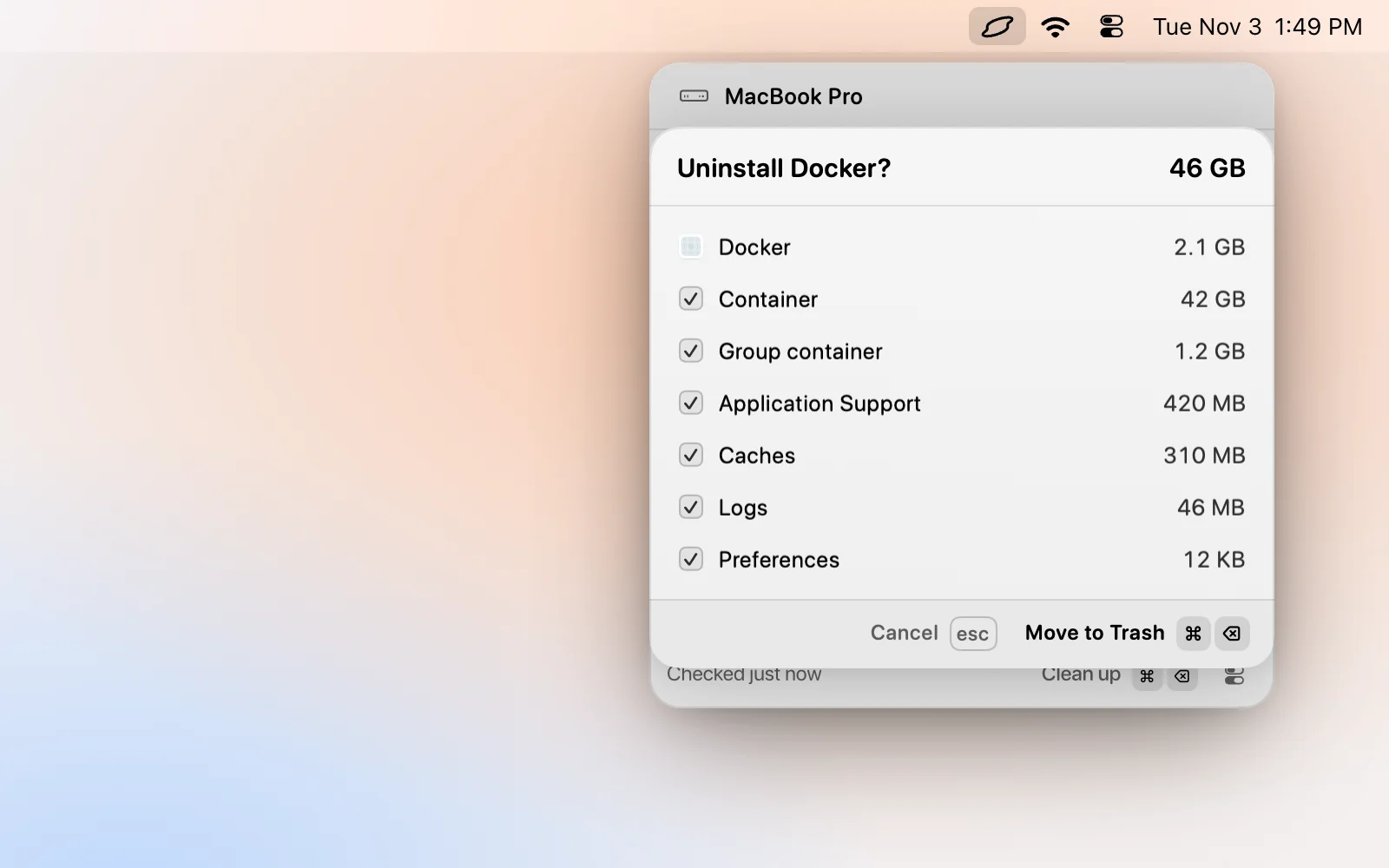
To remove the app, press ⌘K and type “uninstall docker”. The confirm step lists Docker and its leftovers, such as Application Support, caches and preferences, each with a size, and you untick what you want to keep. Your agent only reads; Levo does the removal. Privileged helpers in /Library are outside what Levo removes, so run the sudo lines above for those. More in Uninstall apps and their leftovers. Uninstalls go to the Trash, and Put back in ⌘K restores the app with its leftovers for a day.
FAQ
Where does Docker store its images on a Mac?
In one disk image, Docker.raw, inside ~/Library/Containers/com.docker.docker/Data/vms/0/data. It grows as you pull images and build, and it doesn’t shrink by itself when you delete things inside Docker.
Does uninstalling Docker delete my containers and volumes?
Yes. Containers, images and volumes live inside Docker.raw, which goes with the uninstall. Export volumes you need with docker run and tar, and save images with docker save, before you start.
Can I free the space without uninstalling Docker?
Yes. Run docker system prune -a --volumes after checking what it will remove, or reset Docker’s disk from its Troubleshoot menu. The Docker Desktop settings also let you cap the disk image size.
Docker is still in my Terminal after uninstalling. Why?
A docker link in /usr/local/bin or an old path in your shell config is still there. Run which docker, check where it points, remove the link and any path lines in .zshrc, then open a new Terminal window.