
Levo guides · Memory, CPU and GPU
Idle dev servers and daemons eating memory: find and quit them
Dev tools leave processes behind: a Node dev server you forgot, a Gradle daemon from last week, a Kotlin compiler, a Docker VM. Each holds hundreds of megabytes. Find them by the port they listen on or by how long they have been running, then quit the ones you are not using.
| Process | What it is | Safe to quit when idle? |
|---|---|---|
| node, vite, next, webpack | A dev server on a port | Yes, restart when needed |
| java (Gradle daemon) | Keeps builds fast | Yes, it restarts on the next build |
| KotlinCompileDaemon | Kotlin compiler server | Yes |
| com.docker.virtualization / OrbStack | The container VM | Yes, once no containers are needed |
| postgres, redis, mongod (Homebrew) | Local databases | Only if no app uses them |
| ollama, LM Studio | Local model servers | Yes, they hold the model in memory |
| Python (uvicorn, flask, jupyter) | A local server or notebook kernel | Yes, if the project is closed |
| Simulator and emulator processes | Phone simulators left running | Yes, they hold gigabytes |
| Agent-started shells and servers | Left by a coding agent | Yes, once the session is over |
How to find them
Start with what is listening on a port. Dev servers almost always do:
lsof -iTCP -sTCP:LISTEN -n -PEach line shows the process name, its PID and the port (3000, 5173, 8080, 5432). Anything on a port you do not recognise, or with a project you finished, is a candidate.
Then check age and memory. Processes that have run for days are the likely forgotten ones:
ps -Aceo pid,etime,rss,comm | sort -k3 -n -r | head -15etime is how long it has been running, rss is memory in kilobytes. For Gradle, ask it directly:
./gradlew --status
./gradlew --stop
To stop one, use kill with the PID. Without -9, it shuts down cleanly:
kill 4821Or open Activity Monitor, search for the name, select it and click the stop button.
Do not quit a database or server that another app is using: an open editor may rely on its language server, and quitting a database loses nothing but kills its connections. If you are unsure, check the port and the project's folder first with lsof -p 4821 | grep cwd.
Why they pile up
Gradle and Kotlin daemons stay alive on purpose to make the next build faster, and a day's work can leave several versions running. Closing a terminal does not always stop a dev server started with &, a script or an agent's shell. Coding agents often start servers and builds and do not clean them up. Over a week these add up to several gigabytes and keep the CPU warm.
If your Mac is already running slow or short on memory, this is one of the first places to look. The free up RAM guide puts it in context.
Finding them by project
A name like node or java tells you little, so check where it was started. The working directory shows which project owns the process:
lsof -a -d cwd -p 4821
ps -o pid,etime,command -p 4821
If the folder is a project you finished, or is gone, the process is a leftover. If it is today's project, leave it.
Stopping a whole family
Several tools spawn many processes. Stop them by name rather than one PID at a time. Match carefully, because pkill matches substrings:
pgrep -fl GradleDaemon
pkill -f GradleDaemon
pkill -f KotlinCompileDaemon
pkill -f "vite"
Run pgrep -fl first to see exactly what will match. For Docker Desktop, use its menu bar icon and choose Quit Docker Desktop, which stops its VM. OrbStack and Colima have orbctl stop and colima stop.
Stopping them from coming back
- Set Gradle's daemon to expire sooner, or run builds with
--no-daemonon a small Mac. - Use a dev-server command that exits with the terminal, not one started in the background.
- Tell your coding agent to stop the servers it starts when the task is done.
- Check Activity Monitor's Memory tab at the end of a work day. Five minutes there is cheaper than a slow morning.
How Levo does it
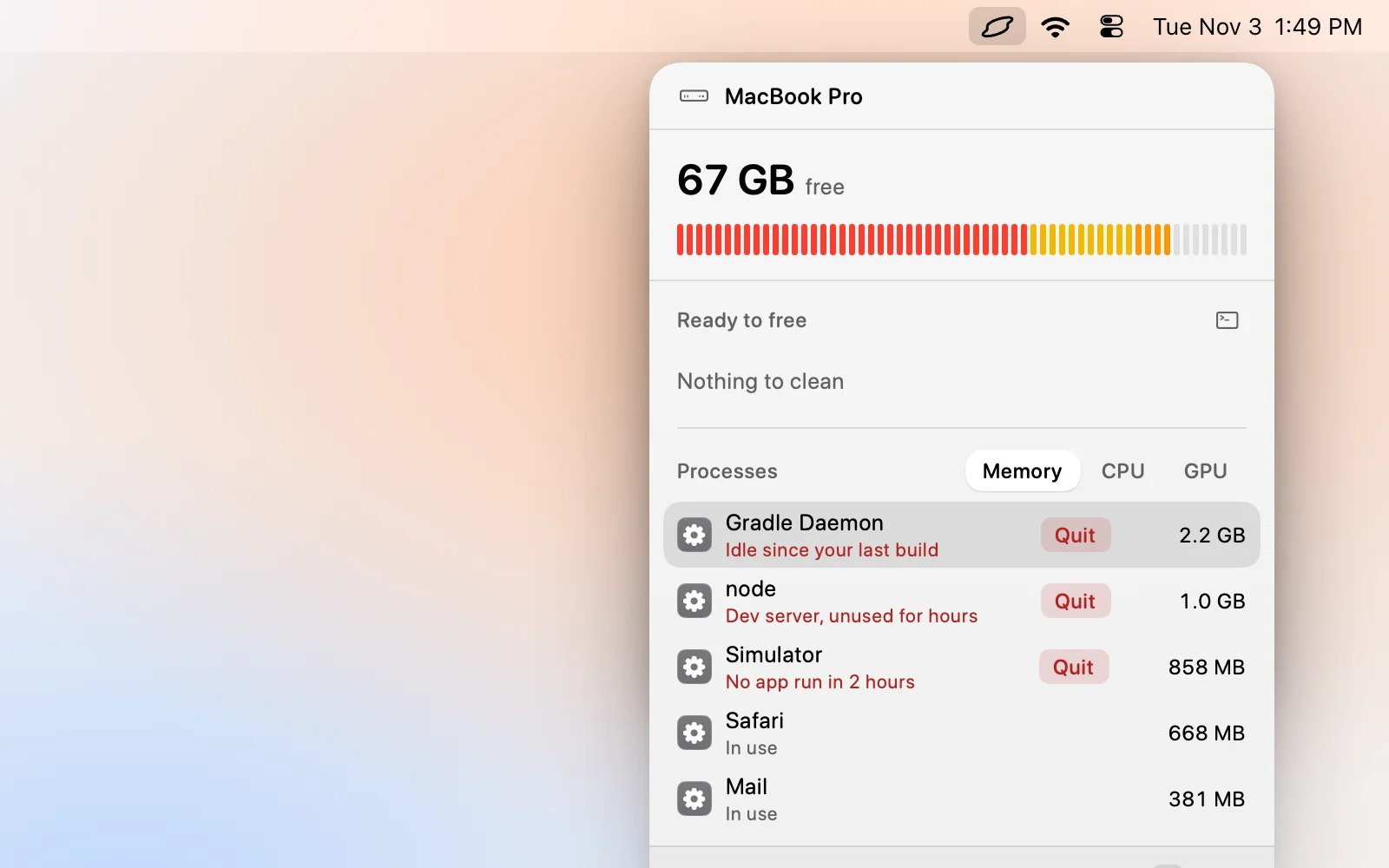
Levo is built for this. Its Processes list shows the busiest processes by memory, CPU and GPU, and its measurement includes how long each has been running and whether it has done anything recently. Your own agent CLI turns that into a verdict you can read: "Gradle daemon idle 3 h", "node dev server idle since yesterday", with a Quit button.
The agent can only read. Levo does the quitting, and it never quits system processes, other users' processes or itself. Anything you are actively using, such as a server with recent traffic, is left alone.
You can also press ⌘K and type Quit to find a process from the keyboard. Details are in Free memory, CPU and GPU, and the coding agents' mess article covers what agents leave behind.
FAQ
How do I find what is using a port on a Mac?
Run lsof -iTCP -sTCP:LISTEN -n -P in Terminal. It lists every listening process with its PID and port.
Is it safe to quit a Gradle daemon?
Yes. The daemon only caches work to speed up builds. The next build starts a new one, a little slower the first time.
Why does my Mac still use memory after I closed the terminal?
Background processes started from a script, an agent or with an ampersand can outlive the terminal window. Find them with ps or Activity Monitor.
Do idle dev servers use much memory?
One does not use much, but a Node server, a Gradle daemon, a Kotlin daemon and a container VM together can hold several gigabytes.
Will quitting a dev server lose my work?
No. It only stops the running copy. Your code is on disk. Restart the server when you need it.
How much memory do dev daemons use?
A Gradle daemon can hold one to several gigabytes, a Kotlin daemon a gigabyte or more, and Node servers a few hundred megabytes each.