
Levo guides · Uninstalling apps
How to uninstall Ollama on a Mac
Quit Ollama from its menu bar icon, delete the app and the ollama link, then remove ~/.ollama. That folder holds every model you’ve pulled, so it’s where the gigabytes are, and it isn’t touched when you remove the app.
| What | Where | Safe to delete? |
|---|---|---|
| Ollama app | /Applications/Ollama.app | Yes |
| CLI link | /usr/local/bin/ollama | Yes |
| Models | ~/.ollama/models | Yes; each one is re-downloadable but can be 4 to 40 GB |
| Keys, history and logs | ~/.ollama/id_ed25519, history, logs | Yes |
| App data and caches | ~/Library/Application Support/Ollama, ~/Library/Caches/com.electron.ollama, ~/Library/Caches/ollama | Yes |
| Preferences and saved state | ~/Library/Preferences/com.electron.ollama.plist, ~/Library/Saved Application State/com.electron.ollama.savedState | Yes |
| Login item | System Settings › General › Login Items & Extensions | Remove the Ollama entry |
| Custom model folder | Wherever OLLAMA_MODELS points | Check your shell config and the app’s launch settings |
| Homebrew install | /opt/homebrew/Cellar/ollama | Yes, with brew uninstall |
How to do it yourself
1. See what you’ve got
ollama list
ollama ps
du -sh ~/.ollama
The list shows each model with its size. Write down the ones you’ll want again, since they’re re-downloaded by name with ollama pull. If you only want space, remove single models with ollama rm name:tag instead. How to delete Ollama models goes through it.
2. Quit it
Click the llama in the menu bar and choose Quit Ollama. Quitting the app stops the server it runs in the background on port 11434. If you started ollama serve in a Terminal, stop it with ⌃C. If Ollama is still running, check with:
pgrep -fl ollama3. Remove the app and the command
rm -rf /Applications/Ollama.app
sudo rm -f /usr/local/bin/ollama
Then open System Settings › General › Login Items & Extensions and remove Ollama from Open at Login, if it’s listed. If you installed with Homebrew, use this instead, and stop the service first:
brew services stop ollama
brew uninstall ollama
4. Delete the data
rm -rf ~/.ollama
rm -rf ~/Library/Application\ Support/Ollama
rm -rf ~/Library/Caches/com.electron.ollama ~/Library/Caches/ollama
rm -f ~/Library/Preferences/com.electron.ollama.plist
rm -rf ~/Library/Saved\ Application\ State/com.electron.ollama.savedState
If you moved the models with the OLLAMA_MODELS environment variable, the big folder isn’t ~/.ollama/models. Check echo $OLLAMA_MODELS and your ~/.zshrc, and delete that folder too. Models on an external drive are easy to forget.
5. Check your tools
Editors, Open WebUI, Continue and similar tools that point at localhost:11434 will report a refused connection afterwards. Switch them to another provider or remove their Ollama setting. Models you pulled with other tools, such as LM Studio or Hugging Face downloads, are in different folders: see LM Studio models and the Hugging Face cache.
How Levo does it
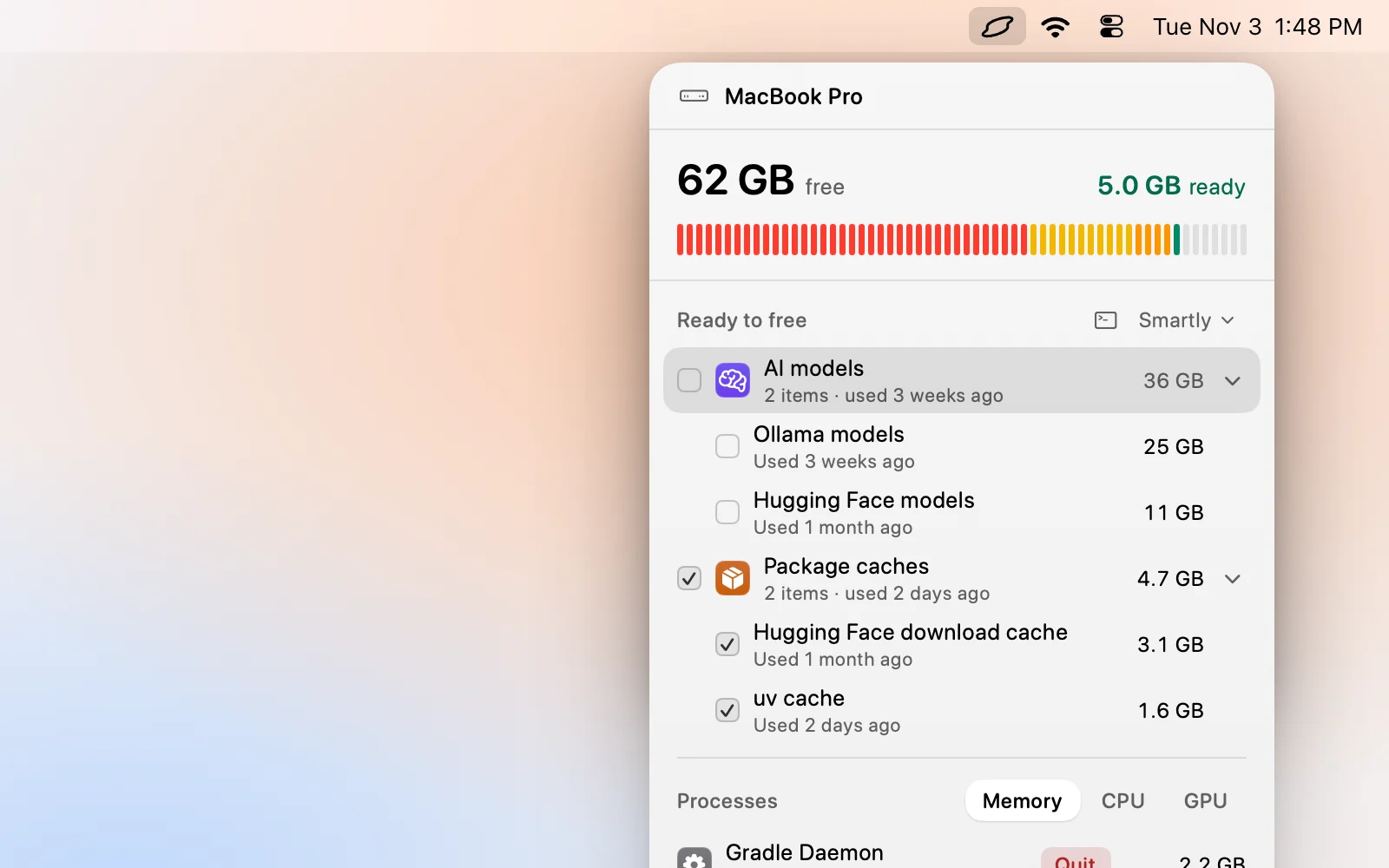
Models are the biggest thing on many Macs, so Levo lists them but never ticks them for you. In the Ready to free list, Ollama’s models show up with sizes under AI models, and you choose which to remove. Levo doesn’t delete anything you haven’t ticked, and your agent only reads.
To remove the app, press ⌘K and type “uninstall ollama”. The confirm step lists the app and its leftovers, such as Application Support, caches and preferences. If Ollama is running, ↵ quits it first. The ollama link in /usr/local/bin is a manual step, as above. See Uninstall apps and their leftovers and AI models in Levo. Uninstalls go to the Trash, and Put back in ⌘K restores the app with its leftovers for a day.
FAQ
Where does Ollama store models on a Mac?
In ~/.ollama/models, unless you set OLLAMA_MODELS to another folder. Each model can take 4 to 40 GB, and removing the app doesn’t delete them.
How do I stop Ollama from starting at login?
Open System Settings, go to General, then Login Items & Extensions, and remove Ollama from Open at Login. Quitting from the menu bar stops the server until you open it again.
Can I delete one model instead of everything?
Yes. Run ollama list to see them, then ollama rm followed by the model name and tag. The space comes back straight away.
Will I lose my chats?
The Ollama app and command line don’t keep your chat history as a library, apart from a prompt history file in ~/.ollama. Tools that use Ollama, such as Open WebUI, store chats in their own place.