
Levo guides · Memory, CPU and GPU
“Your system has run out of application memory”: what to do
This message means RAM and swap are both full. Choose Force Quit in the dialog, pick the app using the most memory (macOS lists them with sizes), and quit it. Then find out why it grew, because it will happen again if one app is leaking.
| Usual culprit | How to spot it | Fix |
|---|---|---|
| A leaking app | One process at tens of GB | Quit it, update it, restart it daily |
| Browser with many tabs | Many helper processes | Close tabs, use tab suspension |
| Virtual machine or Docker | One big, steady process | Lower its memory allowance |
| Dev servers, build daemons | Node, Java, Gradle, long uptime | Quit the idle ones |
| Local AI model | One process at the model's size | Pick a smaller model or quit it when idle |
What to do in the moment
- In the dialog, the list shows apps sorted by memory. Select the biggest and click Force Quit. Unsaved work in that app is lost, so if you can still switch to it, save first.
- If the dialog does not appear, press ⌥⌘⎋ to open Force Quit Applications.
- If the Mac is frozen, wait a minute. macOS may recover once swap clears. As a last resort, hold the power button, and expect to lose unsaved work.
- After it recovers, open Activity Monitor › Memory and sort by memory. Note what grew.
Find the culprit and stop it recurring
Look at Swap Used and the Memory column. A single process far larger than the rest is a leak or a runaway task. Common causes are a browser tab running a heavy page, an app that has run for weeks without a restart, a simulator or emulator, and a build tool that holds its cache. Quit it, check for an update, and restart it. If it grows again within hours, the app has a bug: use an older version or an alternative.
ps -Ao pid,rss,etime,comm -m | head -n 10
sysctl vm.swapusage
The first command lists the ten biggest processes with how long each has been running (etime). Anything big and very old is suspect.
Also check free disk space. Swap needs room on the SSD, and a nearly full disk makes this message much more likely. See memory vs storage.
Prevent it
- Quit apps you finished with instead of leaving them open for weeks.
- Keep at least 10 to 15% of the disk free so swap has room.
- Restart the Mac now and then.
- Give virtual machines and Docker a fixed memory limit below half of your RAM.
Check the numbers after it recovers
Once the Mac is responsive, a few commands tell you what happened. Run them straight away, before you reopen everything:
memory_pressure
sysctl vm.swapusage
vm_stat | grep -E "Pageouts|Swapouts"
top -o mem -l 2 -n 8 | tail -n 12
If swap is still in the tens of gigabytes with only a few apps open, something is still leaking. Restarting the Mac is a reasonable next step and costs less time than hunting for a ghost.
If it keeps coming back
- Note which app the dialog named the first few times. Repeat offenders are the answer.
- Update that app, and macOS. Memory leaks are often fixed in point releases.
- Check what runs at login in System Settings › General › Login Items & Extensions and remove what you do not need.
- Watch Activity Monitor's Memory column for an hour of normal work to see which process climbs steadily.
- Look at disk space. Under about 10% free, swap struggles and the dialog appears sooner.
If a heavy task triggers it every time, such as a large video export or a big build, the job needs more memory than the Mac has. Close everything else for that task, or split it into smaller parts.
How Levo does it
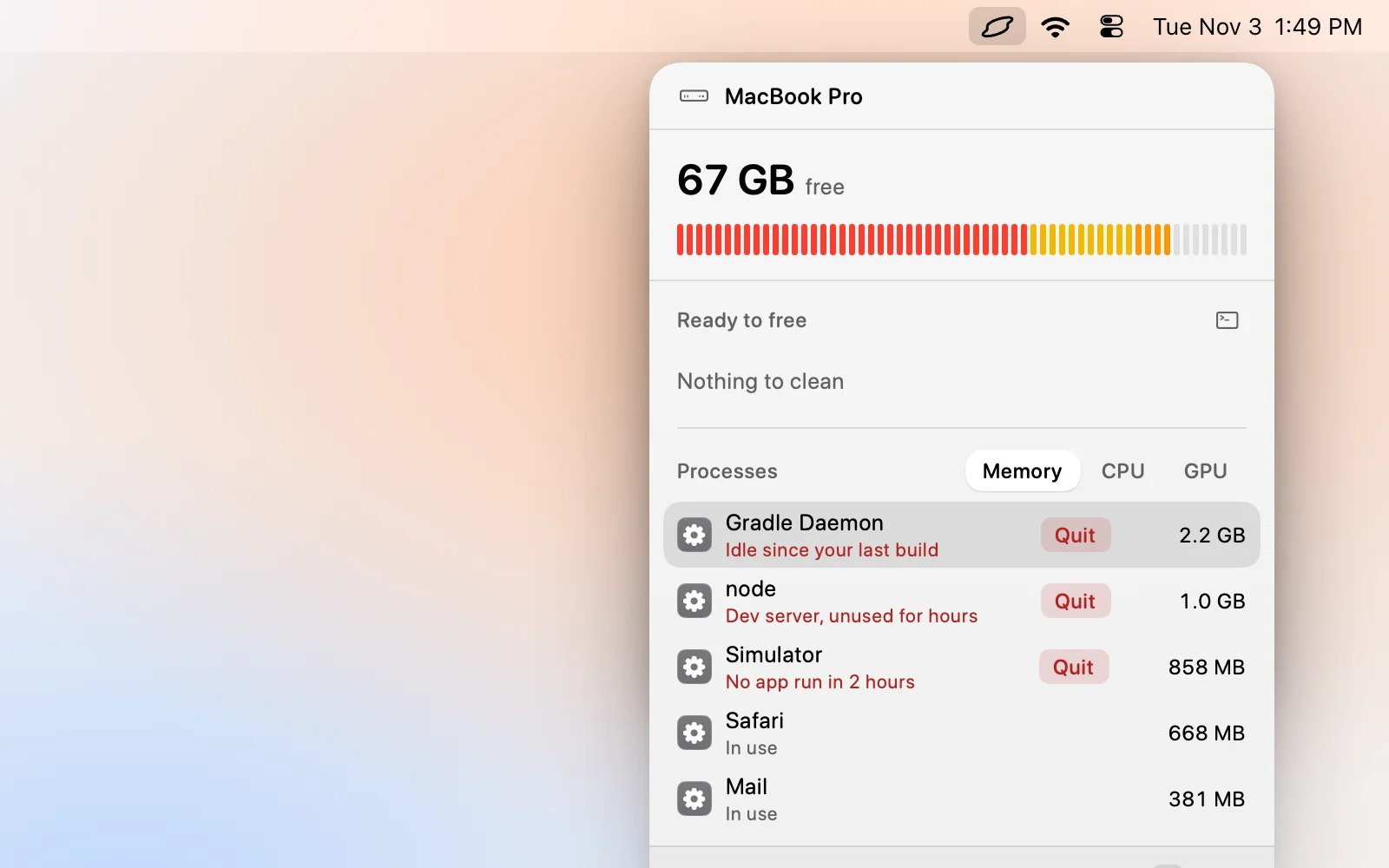
Levo's memory limit warns you before this dialog appears. When pressure stays at Warning or Critical for the time you set, you get a notification, and the popover's Processes list already shows what holds the memory. Each row has your own AI agent's verdict, such as a build daemon idle for hours, and a Quit button.
Click Free memory to quit the ones the agent marked safe, or quit one yourself. If a process will not quit, ⌥⌘Q force quits it after Levo asks. Levo never quits system processes such as WindowServer, Finder or Dock, and it leaves swap to macOS. Details are in the help article.
FAQ
What does 'Your system has run out of application memory' mean?
RAM and swap are both full, so macOS cannot give any app more. It lists the apps using the most memory so you can force quit one.
Will I lose my work?
If you force quit an app with unsaved changes, yes. Many apps autosave, so check, and save in other apps before quitting if you can still reach them.
Why did it happen with only a few apps open?
One of them is probably leaking memory, or a helper process is holding far more than it shows in its window. Sort Activity Monitor by Memory to find it.
Can a full disk cause this?
Yes. Swap files live on the SSD, so a nearly full disk leaves macOS without room to swap and the message comes much sooner.
Should I restart after this message?
If the Mac is slow afterwards, yes. A restart clears the leak and the swap that built up. If it recovers fully after you quit the one big app, you can carry on.
Why does the dialog show apps I am not using?
It lists apps by memory held, not by what you are using. Background and idle apps still count, so quit the ones you do not need.