
Levo guides · Memory, CPU and GPU
Memory vs storage on a Mac
Memory (RAM) is the short-term workspace for what is open right now, and it empties when you shut down. Storage is the SSD where your files and apps live permanently. A Mac low on memory feels slow with many apps open; a Mac low on storage runs out of room to save and update.
| Memory (RAM) | Storage (SSD) | |
|---|---|---|
| What it holds | Open apps and their working data | Files, apps, the system, photos |
| Typical size | 8 to 64 GB | 256 GB to 8 TB |
| After shutdown | Emptied | Kept |
| Where to see it | Activity Monitor › Memory | System Settings › General › Storage |
| When it runs out | Slowdowns, beachballs, out of application memory | Can't save, can't update, "disk almost full" |
| How to free it | Quit idle apps | Delete caches, old files, leftovers |
Why people mix them up
Both are measured in gigabytes, and both are called "space" or "memory" in everyday speech. The Mac also links them: when RAM fills, macOS writes the overflow (swap) to storage, so a nearly full disk can cause memory trouble too. And the System Data category in Storage settings includes swap files, which makes memory look like a storage problem.
Which one is your problem?
- Slow with many apps open, beachballs, fans spinning: likely memory or CPU. Open Activity Monitor and check the Memory Pressure graph.
- Cannot download, save or install an update: storage. Open System Settings › General › Storage.
- "Your disk is almost full": storage.
- "Out of application memory": memory, often made worse by a full disk.
- Slow even with few apps and a green pressure graph: check storage (under 10% free slows swap and indexing), then the CPU tab.
df -h /
memory_pressure | tail -n 1
The first line shows free disk space; the second shows free memory percentage.
Adding storage with an external drive never helps memory, and nothing you delete from the SSD adds RAM. They are separate fixes.
Fixing each
For memory: quit apps you are not using, close heavy tabs, restart now and then, and check Login Items. For storage: empty the Trash, clear caches and installers, remove apps you no longer use with their leftovers, and look at what System Data holds. Keep 10 to 15% of the disk free so swap and updates have room.
Check both in Terminal
One look at each side tells you which problem you have:
df -h /
sysctl hw.memsize
memory_pressure
sysctl vm.swapusage
du -sh ~/Library/Caches
df -h / shows the disk (Apple silicon keeps the system on a separate read-only volume, so the Data volume figure in Disk Utility is the one that counts for your files). hw.memsize is the RAM in bytes. Compare free disk percentage with the free memory percentage from memory_pressure: the lower one is your bottleneck.
Common mistakes
- Buying an external drive to fix slowness. It adds storage, not memory, and the Mac will not run any faster.
- Deleting files to stop beachballs. That only helps if the disk was nearly full.
- Quitting apps to free disk space. Closing apps releases RAM, and may shrink swap, but frees little storage.
- Reading "256 GB" or "16 GB" on a spec sheet as the same thing. The first is storage, the second is memory.
A useful rule: if the Mac is slow while apps are open and fine right after a restart, suspect memory. If it is slow all the time, refuses updates or warns about space, suspect storage. If both look healthy, check the CPU tab for a runaway process before spending money on either.
Rebooting is the cheapest test. It empties memory completely and clears swap, so whatever is still wrong afterwards is not a RAM problem.
How Levo does it
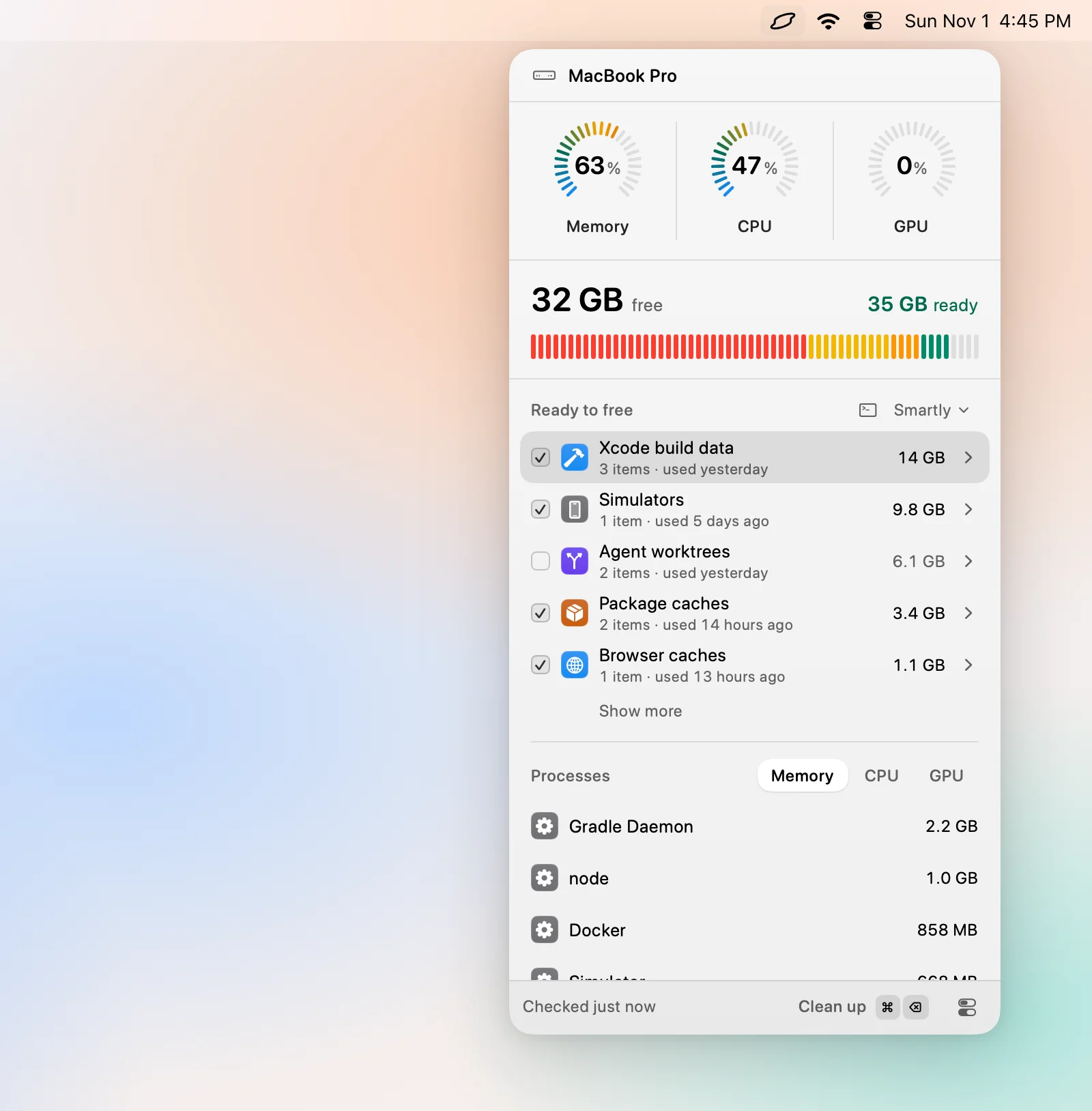
Levo's popover puts both side by side: a disk meter and a memory meter, plus CPU and GPU, each against a limit you set. Disk problems show up as a Ready to free list grouped by kind, with a size and a reason for each, and memory problems show up as the Processes list with a Quit button.
That way you see at a glance which one is the problem and what to do about it. Your own AI agent judges what is safe to remove or quit; Levo does the cleaning and quitting itself, and never touches system processes or macOS's own files. See the popover. Watching is free, and so are the first two cleanups, then a lifetime licence.
FAQ
Is RAM the same as storage on a Mac?
No. RAM is fast, temporary memory for running apps. Storage is the SSD that keeps your files permanently.
Can I free RAM by deleting files?
Not directly. Deleting files frees storage. It helps memory only indirectly, by leaving room for swap.
Does more storage make a Mac faster?
Not in general. It only helps if the disk was nearly full and slowing swap, updates and indexing. For slowness with many apps open, memory is the limit.
Why does System Data include memory?
Swap files, which hold overflow from memory, sit on the SSD and are counted in System Data. They are managed by macOS.
Which matters more for speed, RAM or storage?
For running many apps at once, RAM. For having room to save, update and swap, storage. A fast Mac needs enough of both.
How much free storage does a Mac need?
Keep roughly 10 to 15% free. Below that, updates, swap and indexing all struggle, and the Mac feels slower.